Monarch v0.8 expand result list on laptop sized screen
I have a 16” macbook pro and when monarch appears on the laptop screen and I search, it doesn’t show the top 6 results, it just stays the same size and I have to tab through results blindly.
Laptop screen

On my 27” monitor, monarch expands to show the top 6 search results, and I can navigate down the list.
External Monitor
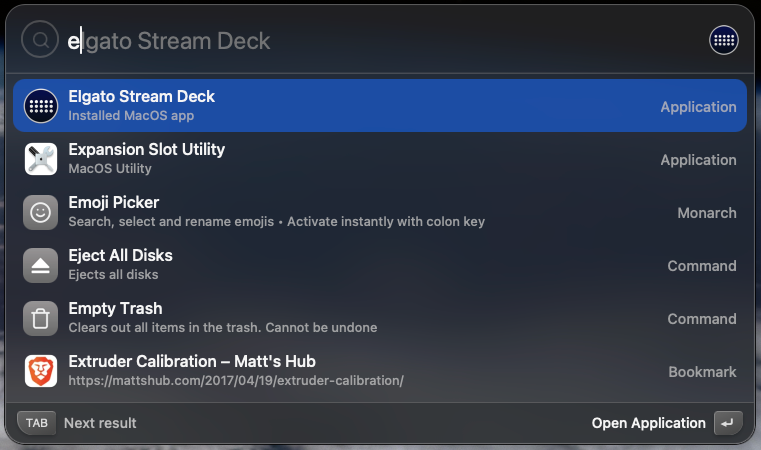
Please expand the result list to show the actual results instead of requiring me to tab blindly through the results when using the laptop-sized screen. There is plenty of screen real estate for it.
Log in to comment and vote
Comments4
rmdashrfv
Oct 16, 2025
This is a bug. Can I ask if you thought this was a deliberate feature?
nofarius
Oct 16, 2025
Yes, thought maybe it was based on screen size/resolution
Anything I can provide to assist in fixing the bug?
rmdashrfv
Oct 16, 2025
Ok thank you for letting me know.
I didn’t want to ask, but it would actually be really helpful if you could film this issue happening in real time externally (like using your phone or something). That would help a ton!
nofarius
Oct 16, 2025
Yeah no worries, video below. Sorry about the reflection of the lights.
What I did:
On external monitor
alt-space to open monarch
type “e”
esc (clear text search)
esc (close monarch)
Move mouse to laptop screen
Click (twice because of “Display Desktop” mac thingo) to ensure the current display is the active one
alt-space to open monarch
type “e”
tab a few times to show that the results are there, just not displayed
esc (clear text)
esc (close monarch)
Disconnect external usb-c display
Repeat but this time it works properly
As an FYI I have 2 external displays that daisy chain through the single usb-c connection, vid only shows 1 of them, but mentioning if that affects anything